Remote Compute
Remote Compute extends the data plane to remote locations (POP) whilest keeping the control plane central. Each POP will have its own set of Contrail control services, which are running in the central location. The difficulty is to ensure that the compute nodes of a given POP connect to the Control nodes assigned to that POC. The Control nodes must have predictable IP addresses and the compute nodes have to know these IP addresses. In order to achieve that the following methods are used:
- Custom roles
- Static IP assignment
- Precise Node placement
- Per Node hieradata
Each overcloud node has a unique DMI UUID. This UUID is known on the undercloud as well as on the overcloud nodes. Hence, this UUID can be used for mapping node specific information. For each POP a Control and Compute role has to be created.
Overview
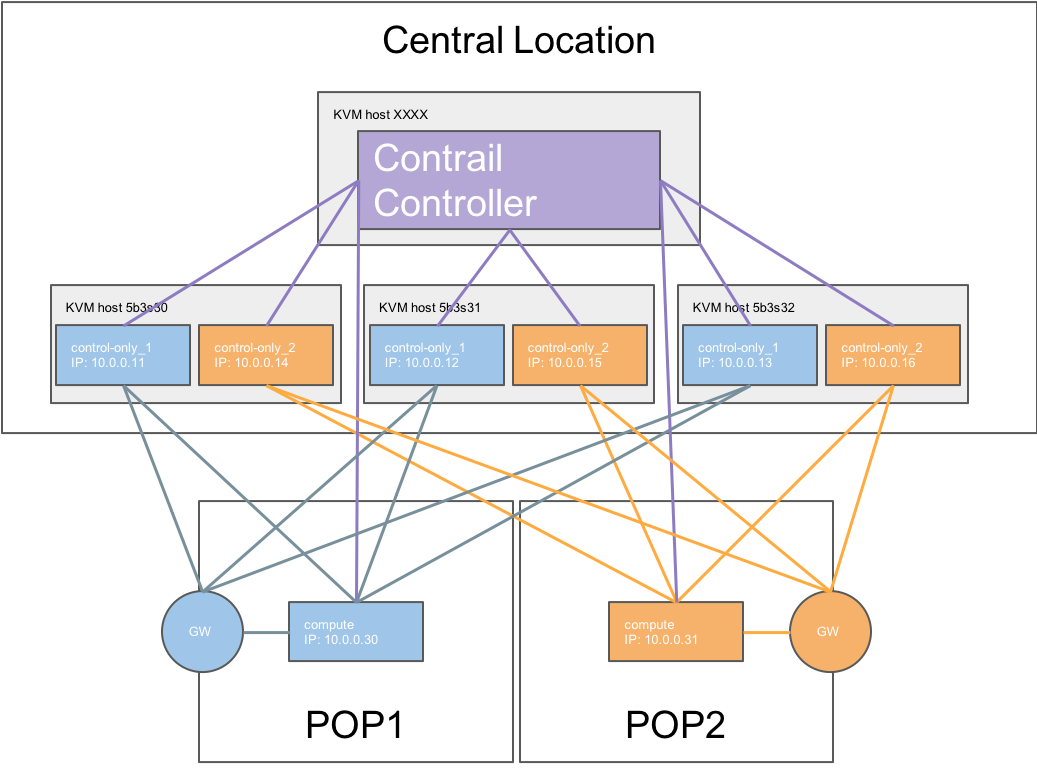
Mapping table
| Nova Name | Ironic Name | Ironic UUID | DMI UUID | KVM | IP address | POP |
|---|---|---|---|---|---|---|
| overcloud-contrailcontrolonly-0 | control-only-1-5b3s30 | 7d758dce-2784-45fd-be09-5a41eb53e764 | 73F8D030-E896-4A95-A9F5-E1A4FEBE322D | 5b3s30 | 10.0.0.11 | POP1 |
| overcloud-contrailcontrolonly-1 | control-only-2-5b3s30 | d26abdeb-d514-4a37-a7fb-2cd2511c351f | 14639A66-D62C-4408-82EE-FDDC4E509687 | 5b3s30 | 10.0.0.14 | POP2 |
| overcloud-contrailcontrolonly-2 | control-only-1-5b3s31 | 91dd9fa9-e8eb-4b51-8b5e-bbaffb6640e4 | 28AB0B57-D612-431E-B177-1C578AE0FEA4 | 5b3s31 | 10.0.0.12 | POP1 |
| overcloud-contrailcontrolonly-3 | control-only-2-5b3s31 | 09fa57b8-580f-42ec-bf10-a19573521ed4 | 09BEC8CB-77E9-42A6-AFF4-6D4880FD87D0 | 5b3s31 | 10.0.0.15 | POP2 |
| overcloud-contrailcontrolonly-4 | control-only-1-5b3s32 | f4766799-24c8-4e3b-af54-353f2b796ca4 | 3993957A-ECBF-4520-9F49-0AF6EE1667A7 | 5b3s32 | 10.0.0.13 | POP1 |
| overcloud-contrailcontrolonly-5 | control-only-2-5b3s32 | 58a803ae-a785-470e-9789-139abbfa74fb | AF92F485-C30C-4D0A-BDC4-C6AE97D06A66 | 5b3s32 | 10.0.0.16 | POP2 |
ControlOnly preparation
Add ControlOnly Overcloud VMs to Overcloud KVM host
Note
This has to be done on the Overcloud KVM hosts
On each of the Overcloud KVM hosts two ControlOnly Overcloud VM definitions will be created.
ROLES=control-only:2
num=4
ipmi_user=ADMIN
ipmi_password=ADMIN
libvirt_path=/var/lib/libvirt/images
port_group=overcloud
prov_switch=br0

/bin/rm ironic_list
IFS=',' read -ra role_list <<< "${ROLES}"
for role in ${role_list[@]}; do
  role_name=`echo $role|cut -d ":" -f 1`
  role_count=`echo $role|cut -d ":" -f 2`
  for count in `seq 1 ${role_count}`; do
    echo $role_name $count
    qemu-img create -f qcow2 ${libvirt_path}/${role_name}_${count}.qcow2 99G
    virsh define /dev/stdin <<EOF
    $(virt-install --name ${role_name}_${count} \
--disk ${libvirt_path}/${role_name}_${count}.qcow2 \
--vcpus=4 \
--ram=16348 \
--network network=br0,model=virtio,portgroup=${port_group} \
--network network=br1,model=virtio \
--virt-type kvm \
--cpu host \
--import \
--os-variant rhel7 \
--serial pty \
--console pty,target_type=virtio \
--graphics vnc \
--print-xml)
EOF
    vbmc add ${role_name}_${count} --port 1623${num} --username ${ipmi_user} --password ${ipmi_password}
    vbmc start ${role_name}_${count}
    prov_mac=`virsh domiflist ${role_name}_${count}|grep ${prov_switch}|awk '{print $5}'`
    vm_name=${role_name}-${count}-`hostname -s`
    kvm_ip=`ip route get 1  |grep src |awk '{print $7}'`
    echo ${prov_mac} ${vm_name} ${kvm_ip} ${role_name} 1623${num}>> ironic_list
    num=$(expr $num + 1)
  done
done
Note
the generated ironic_list will be needed on the Undercloud to import the nodes to ironic
Import ControlOnly nodes to ironic
Get the ironic_lists from the Overcloud KVM hosts and combine them.
Examle:
cat ironic_list_control_only
52:54:00:3a:2f:ca control-only-1-5b3s30 10.87.64.31 control-only 16234
52:54:00:31:4f:63 control-only-2-5b3s30 10.87.64.31 control-only 16235
52:54:00:0c:11:74 control-only-1-5b3s31 10.87.64.32 control-only 16234
52:54:00:56:ab:55 control-only-2-5b3s31 10.87.64.32 control-only 16235
52:54:00:c1:f0:9a control-only-1-5b3s32 10.87.64.33 control-only 16234
52:54:00:f3:ce:13 control-only-2-5b3s32 10.87.64.33 control-only 16235
Import
ipmi_password=ADMIN
ipmi_user=ADMIN

DEPLOY_KERNEL=$(openstack image show bm-deploy-kernel -f value -c id)
DEPLOY_RAMDISK=$(openstack image show bm-deploy-ramdisk -f value -c id)

num=0
while IFS= read -r line; do
  mac=`echo $line|awk '{print $1}'`
  name=`echo $line|awk '{print $2}'`
  kvm_ip=`echo $line|awk '{print $3}'`
  profile=`echo $line|awk '{print $4}'`
  ipmi_port=`echo $line|awk '{print $5}'`
  uuid=`openstack baremetal node create --driver ipmi \
                                        --property cpus=4 \
                                        --property memory_mb=16348 \
                                        --property local_gb=100 \
                                        --property cpu_arch=x86_64 \
                                        --driver-info ipmi_username=${ipmi_user}  \
                                        --driver-info ipmi_address=${kvm_ip} \
                                        --driver-info ipmi_password=${ipmi_password} \
                                        --driver-info ipmi_port=${ipmi_port} \
                                        --name=${name} \
                                        --property capabilities=boot_option:local \
                                        -c uuid -f value`
  openstack baremetal node set ${uuid} --driver-info deploy_kernel=$DEPLOY_KERNEL --driver-info deploy_ramdisk=$DEPLOY_RAMDISK
  openstack baremetal port create --node ${uuid} ${mac}
  openstack baremetal node manage ${uuid}
  num=$(expr $num + 1)
done < <(cat ironic_list_control_only)
ControlOnly node introspection
openstack overcloud node introspect --all-manageable --provide
Get the ironic UUID of the ControlOnly nodes
openstack baremetal node list |grep control-only
| 7d758dce-2784-45fd-be09-5a41eb53e764 | control-only-1-5b3s30  | None | power off | available | False |
| d26abdeb-d514-4a37-a7fb-2cd2511c351f | control-only-2-5b3s30  | None | power off | available | False |
| 91dd9fa9-e8eb-4b51-8b5e-bbaffb6640e4 | control-only-1-5b3s31  | None | power off | available | False |
| 09fa57b8-580f-42ec-bf10-a19573521ed4 | control-only-2-5b3s31  | None | power off | available | False |
| f4766799-24c8-4e3b-af54-353f2b796ca4 | control-only-1-5b3s32  | None | power off | available | False |
| 58a803ae-a785-470e-9789-139abbfa74fb | control-only-2-5b3s32  | None | power off | available | False |
The first ControlOnly node on each of the Overcloud KVM hosts will be used for POP1, the second for POP2
Get the ironic UUID of the POP compute nodes
openstack baremetal node list |grep compute
| 91d6026c-b9db-49cb-a685-99a63da5d81e | compute-3-5b3s30 | None | power off | available | False |
| 8028eb8c-e1e6-4357-8fcf-0796778bd2f7 | compute-4-5b3s30 | None | power off | available | False |
| b795b3b9-c4e3-4a76-90af-258d9336d9fb | compute-3-5b3s31 | None | power off | available | False |
| 2d4be83e-6fcc-4761-86f2-c2615dd15074 | compute-4-5b3s31 | None | power off | available | False |
From that list the first two compute nodes belong to POP1 the rest to POP2
Create an input yaml using the ironic uuids
vi ~/subcluster_input.yaml
---
- subcluster: subcluster1
  asn: "65413"
  control_nodes:
    - uuid: 7d758dce-2784-45fd-be09-5a41eb53e764
      ipaddress: 10.0.0.11
    - uuid: 91dd9fa9-e8eb-4b51-8b5e-bbaffb6640e4
      ipaddress: 10.0.0.12
    - uuid: f4766799-24c8-4e3b-af54-353f2b796ca4
      ipaddress: 10.0.0.13
  compute_nodes:
    - uuid: 91d6026c-b9db-49cb-a685-99a63da5d81e
      vrouter_gateway: 10.0.0.1
    - uuid: 8028eb8c-e1e6-4357-8fcf-0796778bd2f7
      vrouter_gateway: 10.0.0.1
- subcluster: subcluster2
  asn: "65414"
  control_nodes:
    - uuid: d26abdeb-d514-4a37-a7fb-2cd2511c351f
      ipaddress: 10.0.0.14
    - uuid: 09fa57b8-580f-42ec-bf10-a19573521ed4
      ipaddress: 10.0.0.15
    - uuid: 58a803ae-a785-470e-9789-139abbfa74fb
      ipaddress: 10.0.0.16
  compute_nodes:
    - uuid: b795b3b9-c4e3-4a76-90af-258d9336d9fb
      vrouter_gateway: 10.0.0.1
    - uuid: 2d4be83e-6fcc-4761-86f2-c2615dd15074
      vrouter_gateway: 10.0.0.1
Note
Supported node types
control_nodes, compute_nodes, dpdk_nodes and sriov_nodes are supported
Generate subcluster environment
~/tripleo-heat-templates/tools/contrail/create_subcluster_environment.py -i ~/subcluster_input.yaml \
               -o ~/tripleo-heat-templates/environments/contrail/contrail-subcluster.yaml
Check subcluster environment file
cat ~/tripleo-heat-templates/environments/contrail/contrail-subcluster.yaml
parameter_defaults:
  NodeDataLookup:
    041D7B75-6581-41B3-886E-C06847B9C87E:
      contrail_settings:
        CONTROL_NODES: 10.0.0.14,10.0.0.15,10.0.0.16
        SUBCLUSTER: subcluster2
        VROUTER_GATEWAY: 10.0.0.1
    09BEC8CB-77E9-42A6-AFF4-6D4880FD87D0:
      contrail_settings:
        BGP_ASN: '65414'
        SUBCLUSTER: subcluster2
    14639A66-D62C-4408-82EE-FDDC4E509687:
      contrail_settings:
        BGP_ASN: '65414'
        SUBCLUSTER: subcluster2
    28AB0B57-D612-431E-B177-1C578AE0FEA4:
      contrail_settings:
        BGP_ASN: '65413'
        SUBCLUSTER: subcluster1
    3993957A-ECBF-4520-9F49-0AF6EE1667A7:
      contrail_settings:
        BGP_ASN: '65413'
        SUBCLUSTER: subcluster1
    73F8D030-E896-4A95-A9F5-E1A4FEBE322D:
      contrail_settings:
        BGP_ASN: '65413'
        SUBCLUSTER: subcluster1
    7933C2D8-E61E-4752-854E-B7B18A424971:
      contrail_settings:
        CONTROL_NODES: 10.0.0.14,10.0.0.15,10.0.0.16
        SUBCLUSTER: subcluster2
        VROUTER_GATEWAY: 10.0.0.1
    AF92F485-C30C-4D0A-BDC4-C6AE97D06A66:
      contrail_settings:
        BGP_ASN: '65414'
        SUBCLUSTER: subcluster2
    BB9E9D00-57D1-410B-8B19-17A0DA581044:
      contrail_settings:
        CONTROL_NODES: 10.0.0.11,10.0.0.12,10.0.0.13
        SUBCLUSTER: subcluster1
        VROUTER_GATEWAY: 10.0.0.1
    E1A809DE-FDB2-4EB2-A91F-1B3F75B99510:
      contrail_settings:
        CONTROL_NODES: 10.0.0.11,10.0.0.12,10.0.0.13
        SUBCLUSTER: subcluster1
        VROUTER_GATEWAY: 10.0.0.1
Deployment
Add contrail-subcluster.yaml, contrail-ips-from-pool-all.yaml and contrail-scheduler-hints.yaml to the openstack deploy command:
openstack overcloud deploy --templates ~/tripleo-heat-templates \
 -e ~/overcloud_images.yaml \
 -e ~/tripleo-heat-templates/environments/network-isolation.yaml \
 -e ~/tripleo-heat-templates/environments/contrail/contrail-plugins.yaml \
 -e ~/tripleo-heat-templates/environments/contrail/contrail-services.yaml \
 -e ~/tripleo-heat-templates/environments/contrail/contrail-net.yaml \
 -e ~/tripleo-heat-templates/environments/contrail/contrail-subcluster.yaml \
 -e ~/tripleo-heat-templates/environments/contrail/contrail-ips-from-pool-all.yaml \
 -e ~/tripleo-heat-templates/environments/contrail/contrail-scheduler-hints.yaml \
 --roles-file ~/tripleo-heat-templates/roles_data_contrail_aio.yaml